> For the complete documentation index, see [llms.txt](https://docs.sealsecurity.io/llms.txt). Markdown versions of documentation pages are available by appending `.md` to page URLs; this page is available as [Markdown](https://docs.sealsecurity.io/using-platform/sealing-rules/remote-rules.md).
# Remote Sealing Rules
Create, edit, and delete Sealing Rules stored on the Seal Platform.
Remote Sealing Rules are stored on the Seal Platform and managed in the Seal UI. The Seal CLI in remote mode reads them from the platform at run time. This is the default rule storage for the Remote and Automatic Remediation deployment methods.
For the rule model, the four rule types, the substitute-version options, and precedence, see the [Sealing Rules overview](/using-platform/sealing-rules.md). This page covers the UI flows for managing remote rules.
Only users with the **Sealer** or **Admin** role can create, edit, or delete Sealing Rules.
## Creating a Sealing Rule
There are three entry points in the Seal UI. The first two start from a vulnerable package row, so the origin package is already chosen for you; the third lets you create a rule from scratch. Pick the one that fits the situation.
The two row-based flows (Seal button, Seal in all projects) always use the **safest sealed version** as the substitute. To pin to a specific `-sp[N]` or to use the origin version as an exception, you have to create the rule on the [Sealing rules tab](/discovering/protection-page/sealing-rules-tab.md): that is the only entry point with a version picker.
### From the Seal button on a Vulnerable packages tab row
The most direct path when you have a vulnerable row in front of you.
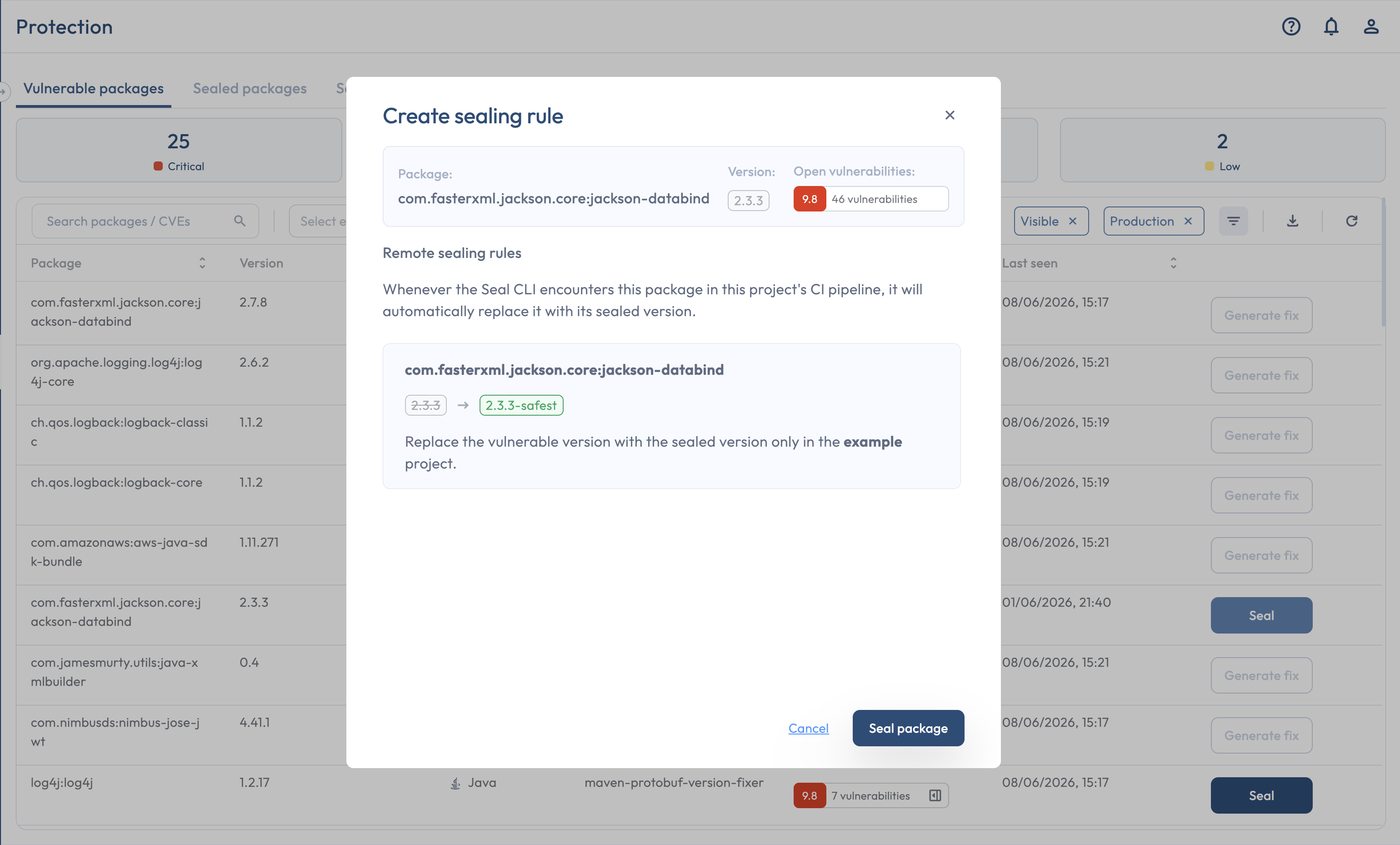
1. On the [Vulnerable packages tab](/discovering/protection-page/vulnerable-packages-tab.md), find the package. Its package state must be **Ready to seal**.
2. Click **Seal** on the row.
3. Confirm in the **Sealing instructions** modal.
The Seal button creates a project-specific rule using the safest sealed version.
This flow creates a **project-specific** rule for the package on the row. It is the only fixed-scope create path; there is no scope toggle in this modal. To seal the same package tenant-wide, use the per-row menu instead (next).
### From the per-row "..." menu: Seal in all projects
When you have a vulnerable row in front of you and want to seal the package across every Seal Project.
1. On the Vulnerable packages tab, open the **"..."** menu on the row.
2. Click **Seal in all projects**.
3. Confirm.
This creates a **tenant-wide**, specific-package rule.
### From the Sealing rules tab: New rule
The from-scratch path, and the **only** entry point that exposes the full rule shape.
1. Open the [Sealing rules tab](/discovering/protection-page/sealing-rules-tab.md).
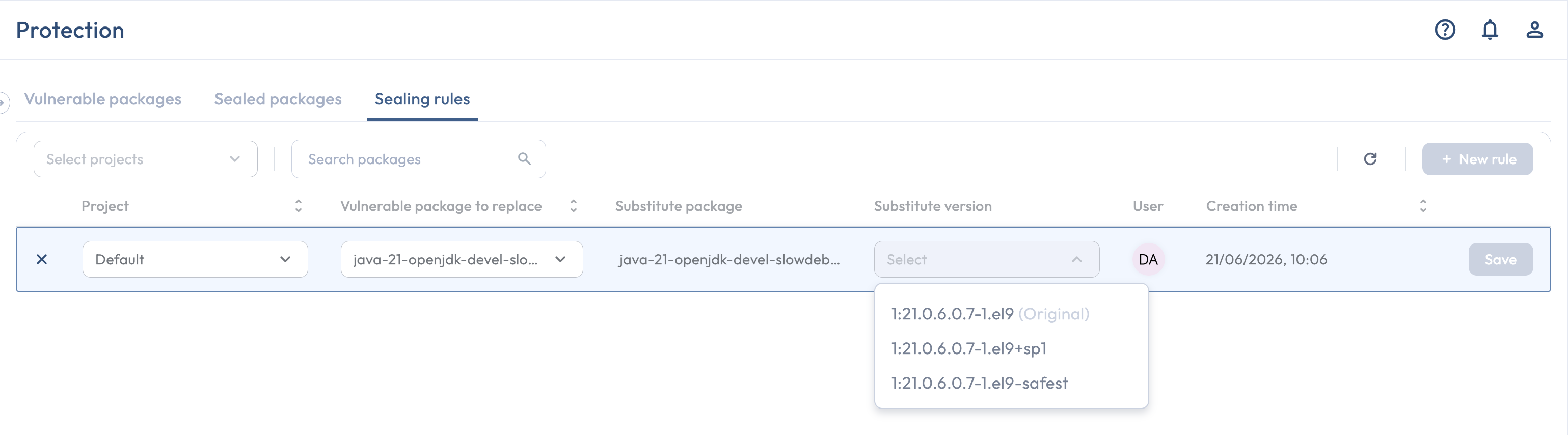
2. Click **New rule** in the tab header. A new editable row appears at the top of the table.
3. Fill in the form fields:
* **Project**: a specific Seal Project, or **All projects** for a tenant-wide rule.
* **Vulnerable package to replace**: a specific package and version, or **All packages** for a blanket rule.
* **Substitute version**: a specific `-sp[N]` (pinned), **Safest version** (un-pinned), or the origin version itself (used as an exception inside a broader rule).
4. Save.
The **Project** picker lists only projects that can take a remote Sealing Rule: projects on the **Remote** deployment method, plus connected projects whose deployment method is not yet determined. Projects on the **Local**, **Automatic Remediation**, **Artifact Server**, or **Manual** deployment method do not appear, because remote Sealing Rules never apply to them.
The Sealing rules tab is the only entry point with a version picker.
This is the only flow that can create a rule covering **all packages**, and the only flow that lets you pin to a specific `-sp[N]` or pick the origin version as the substitute. Anything beyond a simple "seal this row" goes through here.
## Editing a Sealing Rule
Edits happen on the Sealing rules tab.
1. Open the Sealing rules tab.
2. Click the row's edit icon.
3. Change the substitute version, the project, or the package target. The same form as the create flow.
4. Save.
The CLI picks up the edited substitute on the next build. If your edit produces a rule identical to an existing one, the UI shows a **Rule already exists** confirmation.
## Deleting a Sealing Rule
Deletions are available from two places. The Sealing rules tab is the most flexible; the other only works for the simplest case.
### From the Sealing rules tab
The canonical place. Click the delete icon on the row. Works for every rule type: project-specific, tenant-wide, package-specific, all-packages.
### From the per-row "..." menu: Unseal package
On the Vulnerable packages tab, the **"..."** menu on a sealed row has an **Unseal package** action that deletes the rule sealing the package in this row. Only works when:
* the package is sealed by a remote rule (it is hidden in CLI local mode); and
* exactly one rule applies to the package, specifically a project-specific, package-specific rule.
If a broader rule (tenant-wide, or all-packages) also applies to the package, the row menu's Unseal option is hidden. The reasoning is that a row-level action cannot safely express "delete the broad rule that also affects other packages or projects".
### When you must use the Sealing rules tab
* You want to delete a tenant-wide rule.
* You want to delete an all-packages rule.
* Multiple rules apply to a package (for example, a tenant-wide rule plus a project-specific exception) and you want to remove or change one of them. Pick the specific rule to delete on the Sealing rules tab.
Local Sealing Rules cannot be deleted from the Seal UI at all; they live in `.seal-actions.yml` and are edited in the file directly. See [Local Sealing Rules](/using-platform/sealing-rules/local-rules.md).
## Related
* [Sealing Rules overview](/using-platform/sealing-rules.md): the rule model, the four rule types, substitute-version options, and precedence.
* [Local Sealing Rules](/using-platform/sealing-rules/local-rules.md): the file-based counterpart for Local-mode deployments.
* [The Sealing rules tab](/discovering/protection-page/sealing-rules-tab.md): the list view of remote rules.
* [The Vulnerable packages tab](/discovering/protection-page/vulnerable-packages-tab.md): where most create flows start.