> For the complete documentation index, see [llms.txt](https://docs.sealsecurity.io/llms.txt). Markdown versions of documentation pages are available by appending `.md` to page URLs; this page is available as [Markdown](https://docs.sealsecurity.io/discovering/repository-page/sealed-packages.md).

# Browsing sealed packages

Browse the public catalog of sealed packages, with search, per-package detail, and a shareable code diff.

The public catalog at [`https://app.sealsecurity.io/repository/packages`](https://app.sealsecurity.io/repository/packages) lists every sealed package Seal has built. Browsing requires no account.

## The grid

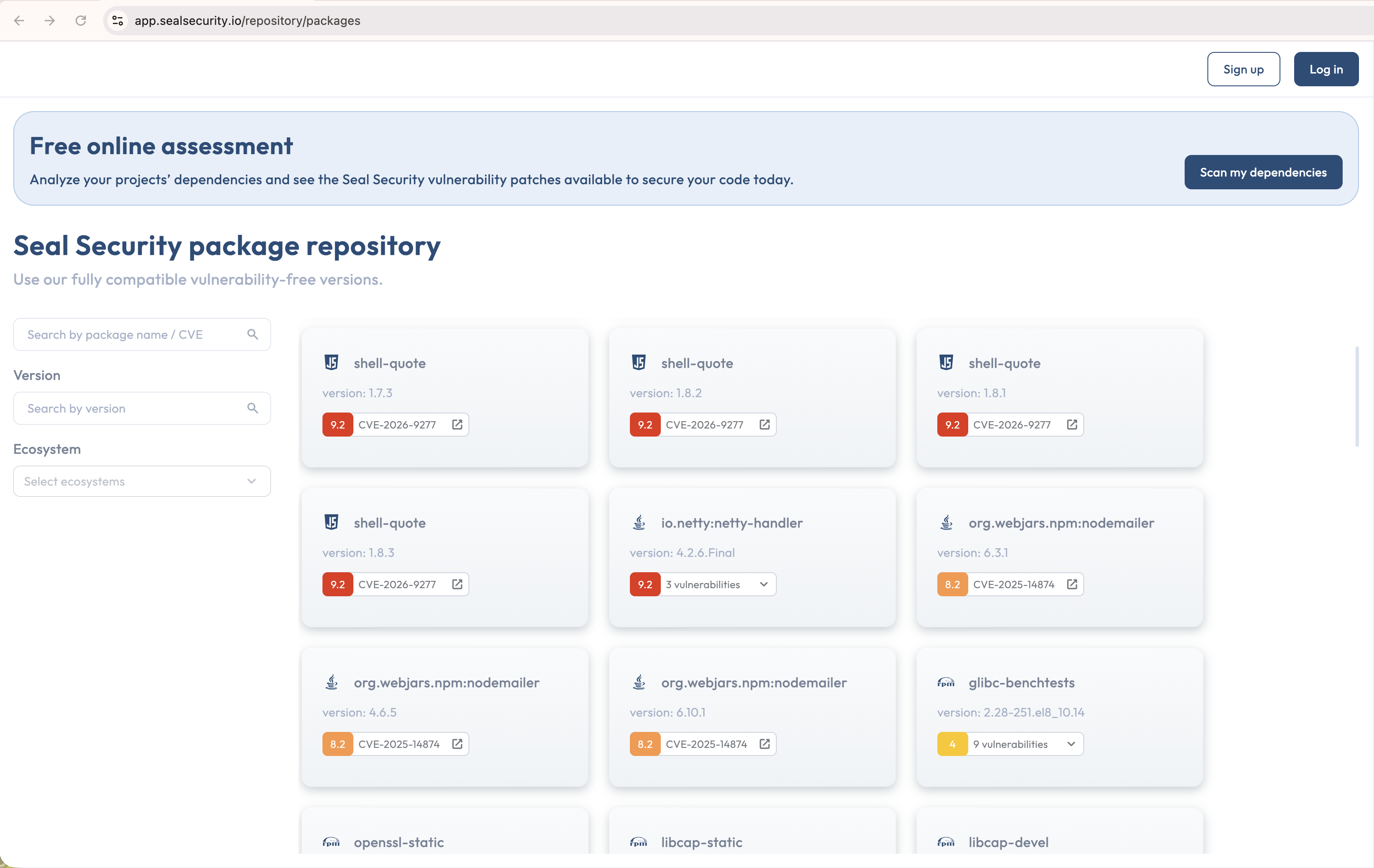
<figure><img src="https://2109738374-files.gitbook.io/~/files/v0/b/gitbook-x-prod.appspot.com/o/spaces%2FytkIsVkwVdKiLQ2CT6Sw%2Fuploads%2Fgit-blob-10f899f00bc21c60267e09e2b64ca47e95e33317%2Frepository-packages-grid.png?alt=media" alt="The public sealed packages catalog grid with the filter sidebar"><figcaption><p>The public catalog of sealed packages, with cards showing ecosystem, version, and severity chips.</p></figcaption></figure>

Each sealed package is a card in an infinite-scroll grid. Each card shows the package name with the ecosystem icon, the package version, and vulnerability chips color-coded by severity that summarize the vulnerabilities the sealed version remediates relative to its origin version.

A search-and-filter sidebar narrows the grid by package name or CVE, by version (prefix match), and by ecosystem.

## Per-package detail

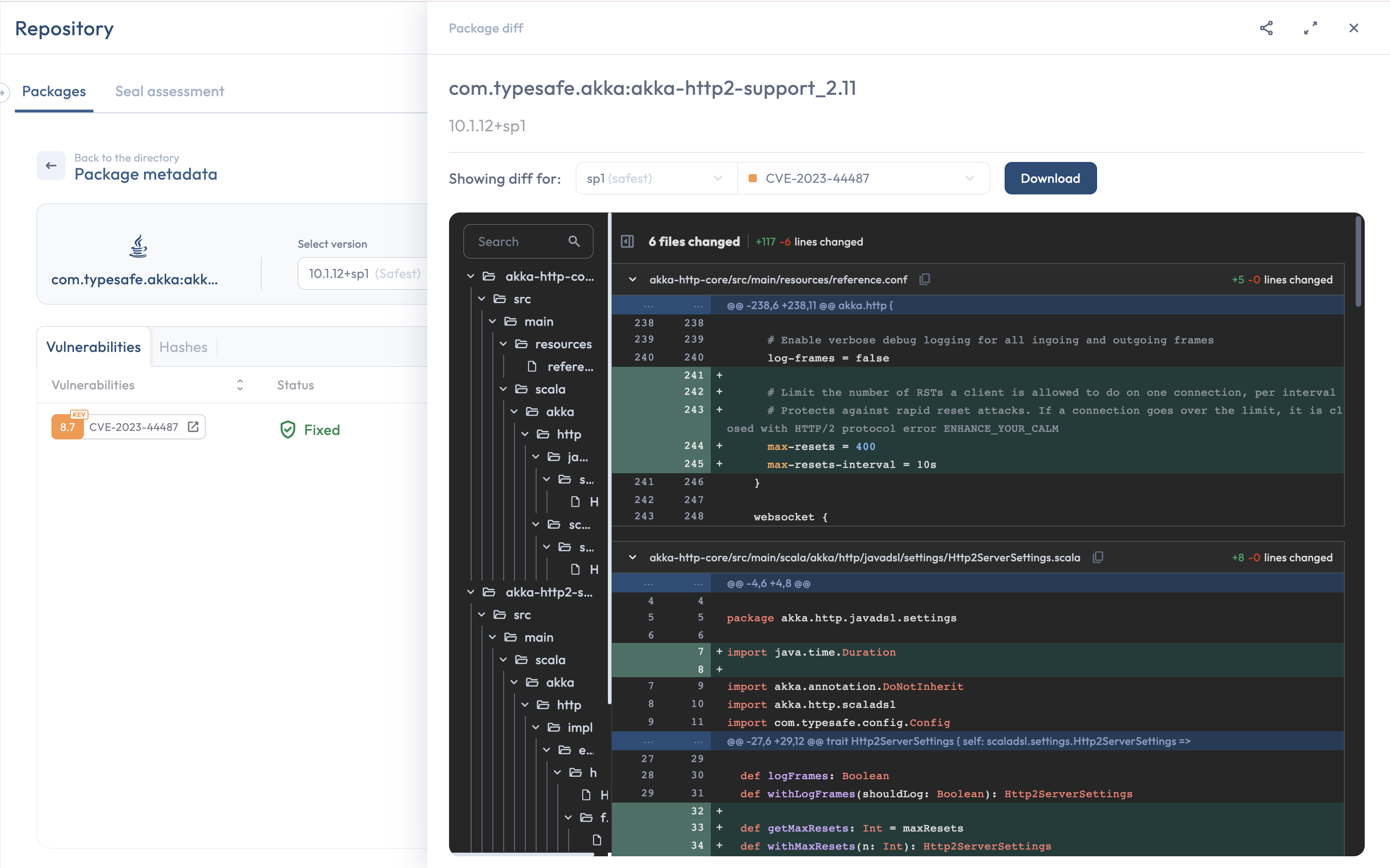
<figure><img src="https://2109738374-files.gitbook.io/~/files/v0/b/gitbook-x-prod.appspot.com/o/spaces%2FytkIsVkwVdKiLQ2CT6Sw%2Fuploads%2Fgit-blob-a8c51026cafb387a5e114519e43c729c632fa789%2Frepository-package-detail-and-diff.png?alt=media" alt="A per-package detail page with the code-diff side drawer and Share button"><figcaption><p>The per-package detail page shows Vulnerabilities and Hashes tabs; the code-diff drawer has a Share button that copies a public link.</p></figcaption></figure>

Clicking a card opens a detail page for that exact `package@version` combination. The detail page has two tabs:

* **Vulnerabilities**: the vulnerabilities affecting the origin version, with severity, a **Status** for the selected sealed version, and links to the upstream advisory. Same shape as [The package drawer](/discovering/package-drawer.md) in your tenant, for the public catalog.
* **Hashes**: the cryptographic hashes of the sealed artifacts (the JAR, wheel, tarball, etc.) for verification.

The Vulnerabilities tab has a **Search vulnerability** field above the table. It narrows the table to the rows whose identifier contains what you type, as a case-insensitive substring match against the identifier shown on the row: the CVE, or the advisory identifier Seal shows for a vulnerability that has no CVE. The search term is kept in the page URL, so you can bookmark or share a filtered view.

A side drawer on the same page shows the per-vulnerability [code diff](/trust/code-diff.md) between the sealed version and its origin version. The diff covers every change Seal made to remediate the vulnerability: the patch itself, plus the dedicated tests Seal added to confirm the patch is effective. The tests are backported alongside the patch so the proof of remediation lives in the same artifact.

### The Status column

**Status** is per selected sealed version. Three values:

* **Fixed**: remediated in the selected version.
* **Sealed in a newer version**: not remediated in the selected version, but remediated in the [safest version](/introduction/glossary.md#safest-version).
* **Wasn't sealed**: still open in the safest version.

On rows that read **Wasn't sealed** while the safest version is selected, a **Request fix** button triggers the same [Generate fix](/discovering/generate-fix.md) action available from the Protection page.

## Downloading a sealed version

Downloading requires being signed in. The **Download** button is on each package's card and on its detail page; both open the **Download sealed version** dialog.

The dialog defaults to the safest version and lets you pick any other released sealed version. For the selected version, it lists the vulnerabilities that version remediates alongside the ones still open in it.

This is the download that the [Manual deployment method](/setup-apps-os/choosing-deployment-method.md) and [on-prem and air-gapped environments](/setup-apps-os/on-prem.md) are built around.

## Sharing a code diff

The code-diff drawer has a **Share** button that copies a public link to the same diff. The link works without authentication; you can paste it into an email, a ticket, or a chat without granting access to anything else in your tenant.

The two common reasons to share a diff:

* An auditor wants to verify that a specific vulnerability was actually addressed in code, not just label-changed.
* A downstream customer wants to verify that the package shipped in your product no longer carries the vulnerability they flagged.

The shared link points at a real, public, verifiable artifact: the patch and its tests. There is no need to share screenshots, internal tooling outputs, or paraphrased descriptions.

## Related

* [The package drawer](/discovering/package-drawer.md): the per-vulnerability content equivalent inside an authenticated tenant.
* [Triggering Generate fix](/discovering/generate-fix.md): the action behind the **Request fix** button on a vulnerability row.
* [Code diff](/trust/code-diff.md): the canonical home for what the side drawer shows.
* [Free assessment](/discovering/repository-page/free-assessment.md): upload your manifest and get back the sealed-coverage answer for every package in it.