> For the complete documentation index, see [llms.txt](https://docs.sealsecurity.io/llms.txt). Markdown versions of documentation pages are available by appending `.md` to page URLs; this page is available as [Markdown](https://docs.sealsecurity.io/discovering/repository-page/free-assessment.md).

# Free assessment

The **free assessment** is a public upload flow on the Repository page. You give it a dependency manifest, lockfile, or SBOM; Seal parses it; and the results page tells you which of the packages in your file have sealed versions available, with severity counts. No sign-in required.

The upload URL is [`https://app.sealsecurity.io/repository/packages/upload`](https://app.sealsecurity.io/repository/packages/upload). It is a public link, suitable to share with a colleague or to send to a prospect who wants a quick read on whether Seal would fix anything in their stack.

## Steps

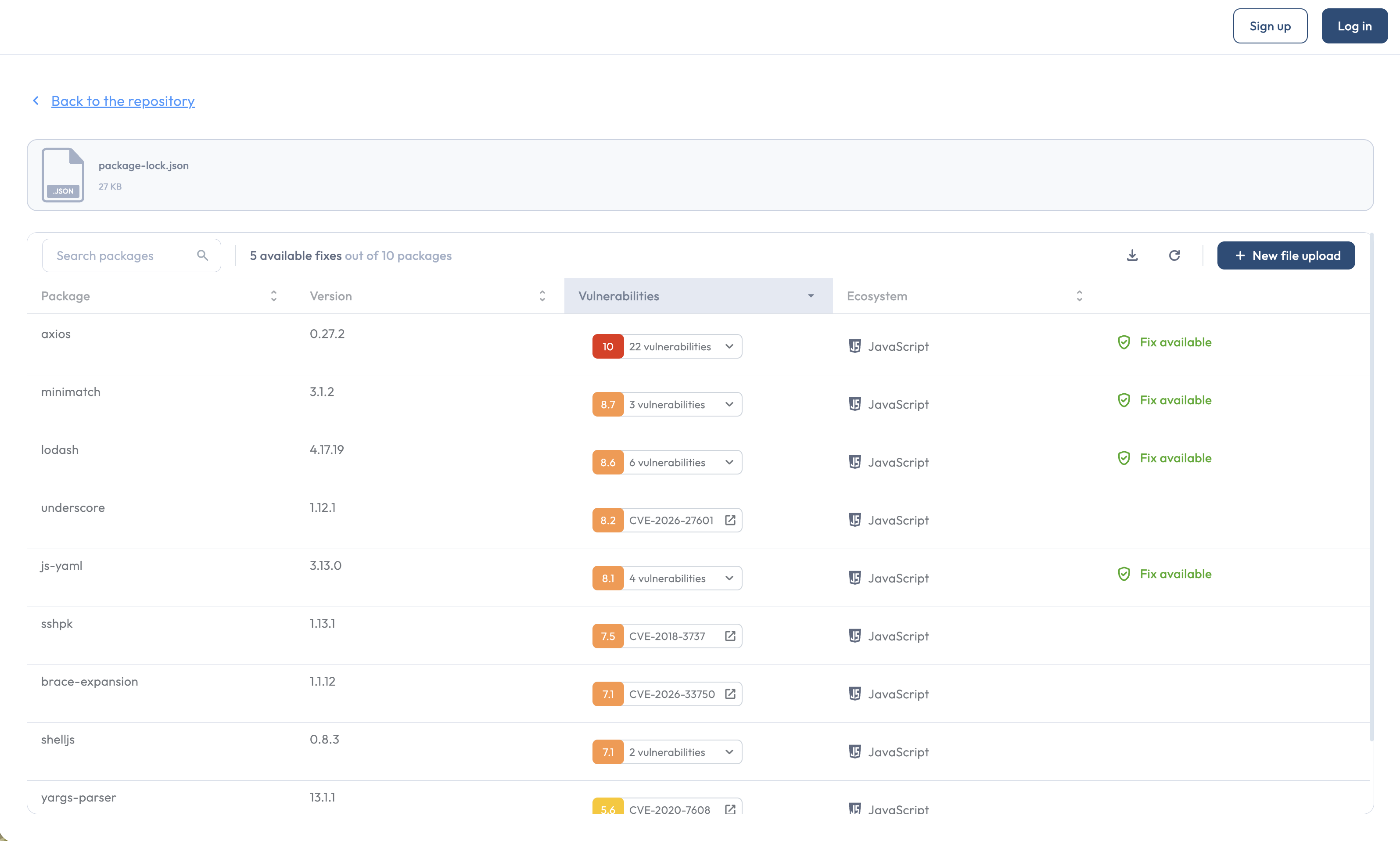
<figure><img src="/files/SQr6hGiEqLvTFSnpw1PS" alt="The free assessment public upload page with the drag-drop area"><figcaption><p>The public upload page accepts a manifest, lockfile, or SBOM by drag-and-drop or browse.</p></figcaption></figure>

1. Open the upload URL.
2. Drag your file onto the upload area, or click to browse.
3. Wait for the file to be parsed. You land on the results page.

## Supported file types

The free assessment accepts the same formats as the [in-tenant Import from file flow](/discovering/importing-manifests.md):

* **Dependency manifests and lockfiles**: `package-lock.json`, `pnpm-lock.yaml`, `yarn.lock`, `requirements.txt`, `Pipfile.lock`, `*.csproj`, `go.mod`, `composer.lock`, `Gemfile.lock`.
* **SBOMs**: CycloneDX or SPDX, in JSON.
* **Snyk CSV exports**.

`package.json` is not accepted; use `package-lock.json` or another lockfile that pins resolved versions.

## The results page

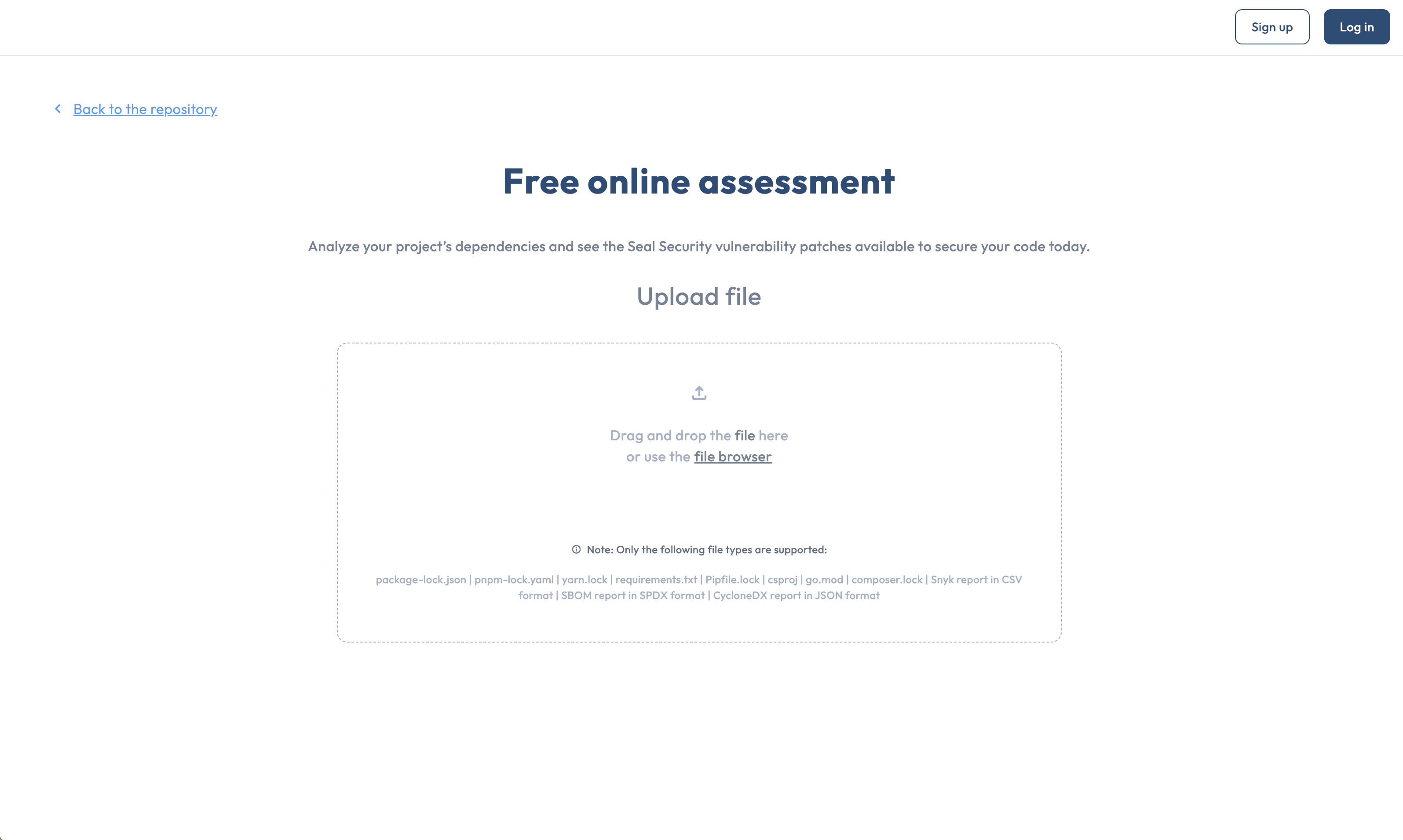
<figure><img src="/files/TcYKzXeAo7GjJtLm12JT" alt="The free assessment results table with Fix available badges"><figcaption><p>The results table marks each row for which Seal has a sealed version with a Fix available badge.</p></figcaption></figure>

After upload, you land on a results table. Each row is one package from the uploaded file, with:

| Column              | Contents                                                            |
| ------------------- | ------------------------------------------------------------------- |
| **Package**         | The package name.                                                   |
| **Version**         | The version pinned in the file.                                     |
| **Vulnerabilities** | The vulnerabilities affecting the package, color-coded by severity. |
| **Ecosystem**       | The package's ecosystem.                                            |
| **Fix available**   | A badge marking rows for which Seal has a sealed version ready.     |

Above the table:

* **Download** the results as CSV.
* **New file upload** to start over with a different file.
* A search box for filtering the table by package name or CVE.

The results page does not require an account; the same anonymous URL works.

## After the assessment

A free assessment is a snapshot. To bring the same picture into a Seal tenant for ongoing remediation, see [Importing manifests & SBOMs](/discovering/importing-manifests.md), which uses the same file types but lands the data in a Seal Project under your tenant.

## Related

* [The Repository page](/discovering/repository-page.md): the parent page.
* [Importing manifests & SBOMs](/discovering/importing-manifests.md): the in-tenant equivalent that creates a Seal Project from the upload.
* [Imported manifest mode](/discovering/package-discovery-mode/imported-manifest.md): the discovery mode an in-tenant import lands a project in.