> For the complete documentation index, see [llms.txt](https://docs.sealsecurity.io/llms.txt). Markdown versions of documentation pages are available by appending `.md` to page URLs; this page is available as [Markdown](https://docs.sealsecurity.io/discovering/protection-page/vulnerable-packages-tab.md).
# The Vulnerable packages tab
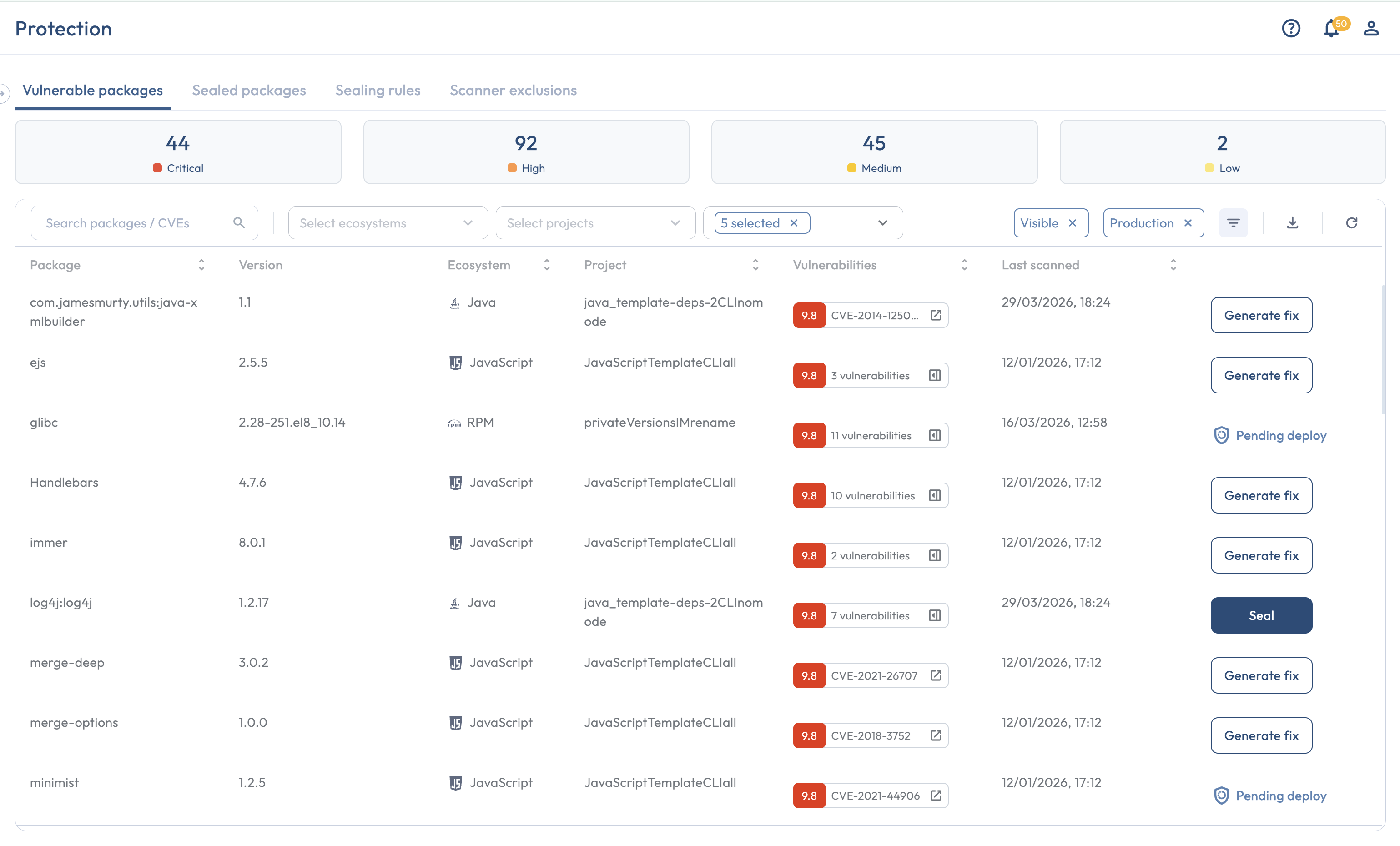
Reference for the columns, filters, and per-row actions on the Vulnerable packages tab.
Every package Seal has discovered with at least one open vulnerability appears in this tab. It is the day-to-day triage view.
The Vulnerable packages tab is the day-to-day triage view.
## Columns
| Column | Contents |
| ------------------- | ------------------------------------------------------------------------------------------------------------------------------------------------------------------------------------------------------------------------------------------ |
| **Package** | The package name (for example, `ejs`, `commons-text`, `requests`). |
| **Version** | The specific package version Seal has discovered (for example, `2.7.4`). A lock icon in front of the version marks a [private version](/discovering/private-versions.md); hovering it reports that backwards compatibility is not perfect. |
| **Ecosystem** | The package's ecosystem (for example, npm, Maven, PyPi). |
| **Project** | The Seal Project this row belongs to. |
| **Vulnerabilities** | The vulnerabilities affecting this package, with severity. |
| **Last seen** | The most recent time Seal saw this package, whichever discovery mode produced the signal. |
Each row also has a state badge (Sealed, Pending deploy, Ready to seal, Version in progress, Generate available, or Unfixable) and an actions menu. The state badge values are documented in [Package states](/discovering/package-states.md).
The default sort is by **severity, descending** (most severe rows at the top). Select any column header (Package, Version, Ecosystem, Project, Vulnerabilities, or Last seen) to sort by that column. Versions sort as text, so `10.0` sorts next to `1.0` rather than after `9.0`.
## Filters
The filter bar with the Availability dropdown open.
| Filter | What it narrows |
| --------------------- | ---------------------------------------------------------------------------------------------------------------------------------------- |
| **Search** | Free-text search across package names and CVE identifiers. |
| **Ecosystem** | Show only one ecosystem at a time. |
| **Project** | Show only rows from one Seal Project. |
| **Availability** | Show rows in a specific package state (Sealed, Pending deploy, Ready to seal, Generate available, and so on). |
| **Visibility** | Show all rows, only visible rows, or only hidden rows. |
| **Development token** | Filter rows by the type of [token](/getting-started/tokens.md) that authenticated the activity. Default: production-token activity only. |
| **Dev dependency** | Include or exclude [development dependencies](/introduction/glossary.md#dev-dependency). Default: excluded. |
The two filters narrow the default view in different ways and are independent: a row excluded by one is not necessarily excluded by the other.
## Per-row actions
The per-row action menu, with "Seal in all projects" among the entries.
The actions available depend on your role.
| Action | Roles |
| ----------------------------------------------------------------------------------------------------------------------------------------------------- | --------------------------- |
| **Seal** (the primary button on a row that has a sealed version available; creates a Sealing Rule using the safest sealed version) | Admin, Sealer |
| **Seal in all projects** (apply the rule across every project where this package and version appear) | Admin, Sealer |
| **Generate fix** (the action behind the **Generate available** state) | Admin, Sealer, Collaborator |
| **Hide** / **Restore** (toggle the row's visibility; hidden rows are excluded from the Dashboard and from reports by default) | Admin, Sealer, Collaborator |
| **Disable private version** (appears only on a row that is using a [private version](/discovering/private-versions.md) this Seal Project has enabled) | Admin, Sealer |
Two of these entries behave differently for private versions:
* **Seal in all projects** is not offered on a row whose recommended version is a private version. A private version is enabled for one Seal Project at a time, so there is no tenant-wide rule to create. Use the **Seal** button, which creates a rule for this row's project.
* **Disable private version** is the only per-row entry point for turning a private version back off, and it is on this tab alone. The Sealed packages tab has no private-version management.
A **Download report** action above the table exports the current filtered set as a Vulnerable Packages report. See [Reports Manager](/using-platform/reports-manager.md).
## Related
* [Package states](/discovering/package-states.md): the meaning of each state badge and the transitions between them.
* [Triggering Generate fix](/discovering/generate-fix.md): the action behind the Generate available state.
* [Sealing Rules](/using-platform/sealing-rules.md): what the **Seal** button creates.