> For the complete documentation index, see [llms.txt](https://docs.sealsecurity.io/llms.txt). Markdown versions of documentation pages are available by appending `.md` to page URLs; this page is available as [Markdown](https://docs.sealsecurity.io/discovering/package-drawer.md).
# The package drawer
What the Protection page drawer shows for a discovered package.
When you click a package on the [Vulnerable packages tab](/discovering/protection-page/vulnerable-packages-tab.md) or [Sealed packages tab](/discovering/protection-page/sealed-packages-tab.md), a drawer opens with the package's detail. The drawer is where you see why a package is flagged and what Seal can do about it.
The drawer is organized into three tabs:
* **Package info**: top-level metadata for the package version (name, version, ecosystem, project, last seen).
* **Vulnerabilities**: the list of vulnerabilities affecting the package version.
* **Package diff** (only when a sealed version exists): the per-vulnerability [code diff](/trust/code-diff.md) between the sealed version and its origin version.
The drawer's footer shows a **Generate fix** button when the package is in the [Generate available](/discovering/package-states.md#generate-available) state. See [Triggering Generate fix](/discovering/generate-fix.md) for what that does.
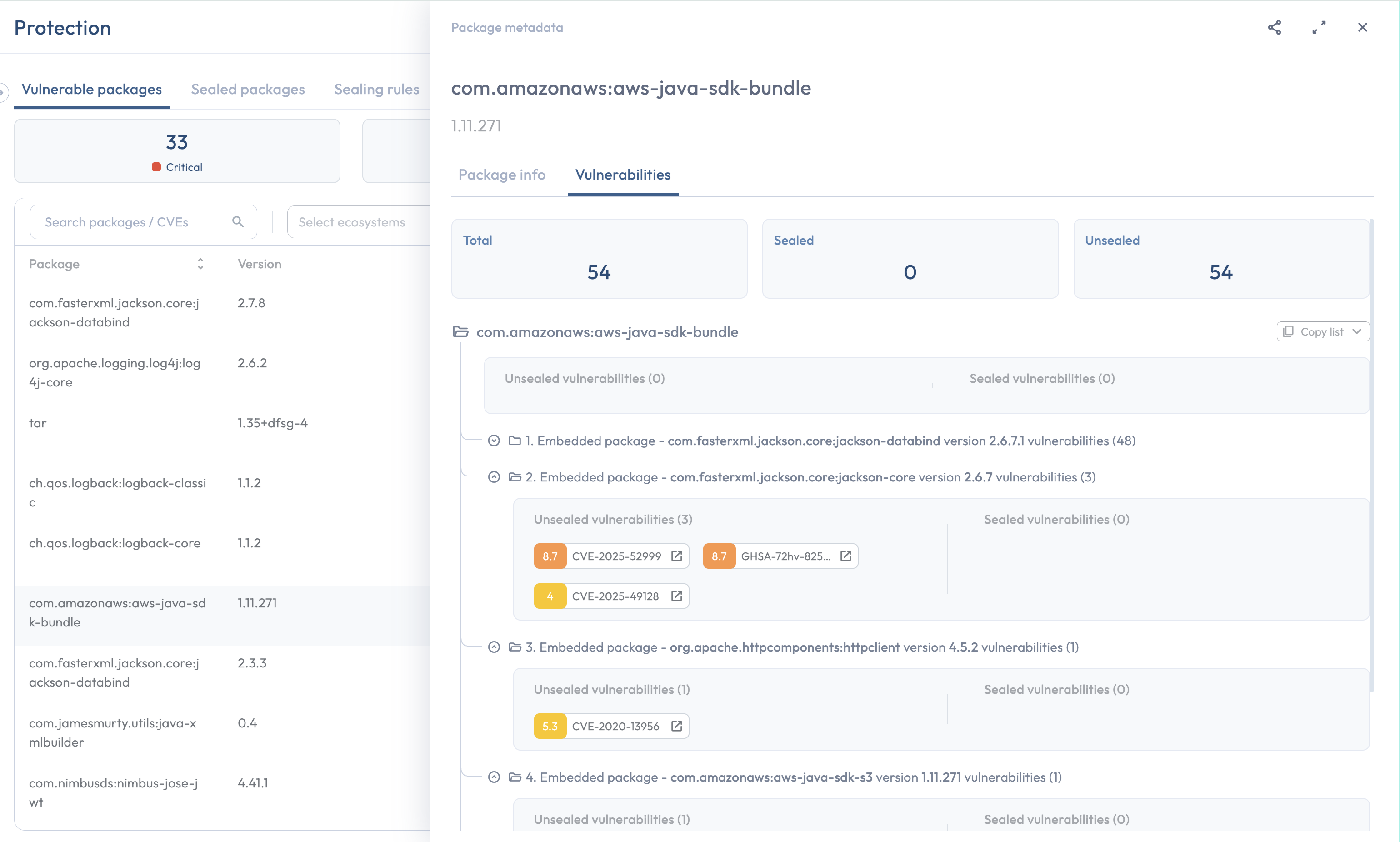
The drawer's Vulnerabilities tab
## The Vulnerabilities tab
The Vulnerabilities tab lists every vulnerability affecting the package version, split into two groups side by side:
* **Sealed**: vulnerabilities Seal has remediated in the current sealed version. These are gone in the sealed counterpart of the origin version.
* **Open**: vulnerabilities that remain.
Each group is headed with its own count, **Sealed vulnerabilities (N)** beside **Open vulnerabilities (N)**, and the cards at the top of the tab repeat the two totals as **Sealed** and **Open**.
Some published packages contain other packages compiled into the same artifact: a Java fat JAR that bundles several smaller packages into one file, a statically-linked C/C++ package, or any other case where one distributed artifact actually includes the code of separate dependencies. Vulnerabilities that originate in those bundled packages rather than in the host package's own code are grouped together under an **Embedded package - `` version ``** indicator, with a count of how many vulnerabilities came from that embedded package. The drawer does not show regular transitive dependencies under this indicator: those appear as their own rows on the Vulnerable packages tab, with their own drawers, because each one is its own distributable artifact.
Each vulnerability shows the same fields:
| Field | Contents |
| ----------------- | ----------------------------------------------------------------------------------------------------------------------------------------------------------------------------------------------------------------------- |
| **Identifier** | The CVE, GHSA, Snyk ID, or other reference. Malicious-package warnings are flagged as such instead of by CVE. |
| **CVSS score** | A numeric score, or **N/A** when no source has published a score. |
| **Severity** | Derived from the CVSS score: **Critical** for 9.0 or higher, **High** for 7.0-8.9, **Medium** for 4.0-6.9, **Low** below 4.0. Vulnerabilities with no score are treated as Low. Malicious packages are always Critical. |
| **KEV badge** | Marks vulnerabilities included in the CISA Known Exploited Vulnerabilities catalog. |
| **Status** | Sealed or open, matching the group the vulnerability is listed under. |
| **Advisory link** | One link to an upstream advisory, routed by the identifier shown: cve.org for CVEs, github.com/advisories for GHSAs, snyk.io for Snyk IDs, osv.dev for malicious-package records. |
### How the CVSS score is chosen
A vulnerability often appears in multiple databases (the National Vulnerability Database, GitHub Advisories, Snyk, Red Hat's CSAF feed) with potentially different CVSS scores. Seal does not pick one feed and ignore the rest. Instead, the score the drawer shows is the **highest** of the scores the available feeds have published for that vulnerability. If no feed has published a score, the field is empty and the vulnerability is treated as Low severity. Malicious packages are scored 10.
### Package-level versus vulnerability-level severity
The Vulnerable packages tab's **Vulnerabilities** column on the row shows a single severity for the whole package. That value is the **maximum** severity across the package's open vulnerabilities. A package with one critical vulnerability and four low ones shows as critical on the row even though most of its vulnerabilities are low. Open the drawer to see the breakdown.
A package's risk is set by the worst vulnerability it carries. A single open critical vulnerability is enough to make the whole package critical to remediate; how many lower-severity vulnerabilities sit alongside it does not change that. An average or a count would understate the urgency of the worst case, which is the part you actually have to act on. Sealed vulnerabilities are excluded because they are no longer in the package: Seal's backport patched them out of the sealed version, so they are not part of the risk profile of the version actually in use.
### Identifiers when a CVE is missing
Not every vulnerability has a CVE assigned. When the identifier in the drawer is not a CVE, Seal uses the next one available, in priority order:
1. **CVE** (`CVE-YYYY-NNNNN`).
2. **Snyk ID** (`SNYK-...`).
3. **GitHub Security Advisory** (`GHSA-...`).
4. Any other vendor-assigned identifier.
Malicious packages are flagged separately and labeled as such.
## The Package diff tab
When a sealed version exists, the **Package diff** tab shows the [code diff](/trust/code-diff.md) between the sealed version and its origin version. You can pick one vulnerability inside the tab and see the diff for that vulnerability alone, rather than the whole-package change set.
The diff covers every change Seal made to remediate the vulnerability: the patch itself, plus the dedicated tests Seal added to confirm the patch is effective. The tests are backported alongside the patch so the proof of remediation lives in the same artifact.
## Related
* [The Protection page](/discovering/protection-page.md): the parent page that hosts the drawer.
* [Triggering Generate fix](/discovering/generate-fix.md): the action behind the **Generate fix** button in the drawer footer.
* [Code diff](/trust/code-diff.md): the canonical home for the per-vulnerability patch view.
* [Partial fixes & open vulnerabilities](/discovering/partial-fixes.md): why some vulnerabilities may show as open in the drawer even after a sealed version is in use.